
Drop in your project.
Open the workflow extension in Final Cut Pro and bring in your project. Choose the dialogue you want to work with.
Turn speech into expressive, editable captions.
Right inside Final Cut Pro. Right on your Mac.
Make every
word count.
Illustrative preview · Five Motion templates included
01 / STAY IN YOUR FLOW
Your timeline is where the story comes together.
That’s where your captions should be, too.
Open the workflow extension in Final Cut Pro and bring in your project. Choose the dialogue you want to work with.
Generate word-timed captions with local speech recognition. Your audio is processed on your Mac, without a cloud transcription service.
Pick a Motion template, tune the look and bring your captions back into a tidy compound clip in your timeline.
NEW IN 1.1.1
Smart Cache, caption editing, Smart Search and about 100 languages. Plus two fixes we made before release.
Smart Cache remembers what it has already transcribed. Run a clip again and it comes back at once. Extend it, and only the new part is processed.
Press Transcribe to run the whole clip.Transcribing the whole clip…Done. The whole clip was transcribed.Back at once. Nothing had to be transcribed.Clip extended. Run it again to see what happens.Transcribing only the new part…Done. Only the new part went through Whisper.
An illustration. Real time depends on your Mac, the clip and the model.
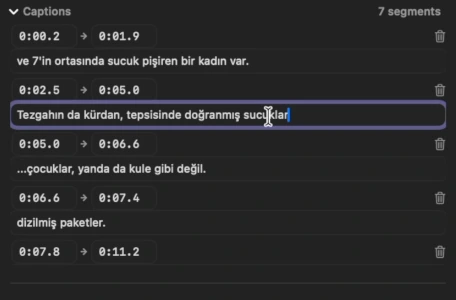
Correct a name, change start and end times, or remove a line. Your edits are saved on your Mac and come back next time.
Search every caption across all your clips. See the text, the file and the timecode. A click won’t jump to the clip.
Try typing “light”
Nothing found. Try another word.
That is the model’s coverage. We did not test every language, so review your captions. Accuracy depends on the language, recording and speaker.
AND TWO FIXES
01 Captions no longer pile up on top of each other, and every caption now has a remove button.
02 Captions stay in sync when your audio is detached or comes from a separate recorder.
Why it’s 1.1.1, not 1.1 ↗02 / GIVE YOUR WORDS SOME CHARACTER
Five built-in Motion templates.
A style for the story you’re telling.
A little motion.
A lot of meaning.
Interactive style illustration. Fine-tune the actual Motion templates in the app and Final Cut Pro.
03 / SMALL TOOL. THOUGHTFUL DETAILS.
A native workflow extension built around the way you already edit.
Speech recognition runs locally after the model download. No uploading your edit for transcription.
Generated titles are grouped in a compound clip inside a secondary storyline.
Install and use the included Motion templates. Add an active subscription when you want automatic AI captions.
Smart Cache and your caption edits are stored on your Mac, not uploaded. You can switch the cache off.
FROM THE EDIT ROOM
1.1.1 is on the Mac App Store with Smart Cache, caption editing, Smart Search and about 100 languages. The extra “.1” is for two bugs we fixed just in time.
Smart Cache, lasting caption corrections, transcript search, and 100 Whisper-model languages with Auto Detect. Here is what we are preparing next.
Our first release brings local AI transcription and five Motion title templates into your Final Cut Pro workflow.
Built for Apple silicon. Requires macOS 26.4 or later and Final Cut Pro. Check the current Mac App Store listing for compatibility before downloading.
The app is free to download, with Motion templates you can install and use independently in Final Cut Pro. Automatic AI caption generation requires an active monthly subscription. Current pricing and any trial eligibility are shown in the App Store.
Transcription is processed locally. An internet connection is needed to download models and for App Store purchases or subscription checks. Read our privacy policy for details.
Yes. Choose from Basic, Highlighted, Highlighted with Background, Pop and Beast Pop, then adjust styling such as the font, colours and position.
Smart Cache, caption editing, Smart Search, about 100 languages with Auto Detect, and a layout that fits smaller windows. Read the full story.
1.1 was finished, then a last test on real projects found two bugs. We fixed both the same day and renumbered. 1.1.1 is 1.1 plus two fixes. The full story.
About 100, plus Auto Detect. That is the speech model’s coverage. We did not test caption quality in each language, so accuracy depends on the language, recording, speaker and model. Please review your captions.
LESS CAPTIONING. MORE CREATING.
v1.1.1 · For Final Cut Pro · Apple silicon · macOS 26.4+
LET’S BUILD THIS TOGETHER
Our launch video and Shorts are on YouTube, and Reels on Instagram. Follow along for demos, editing tips and updates.